Session Overview
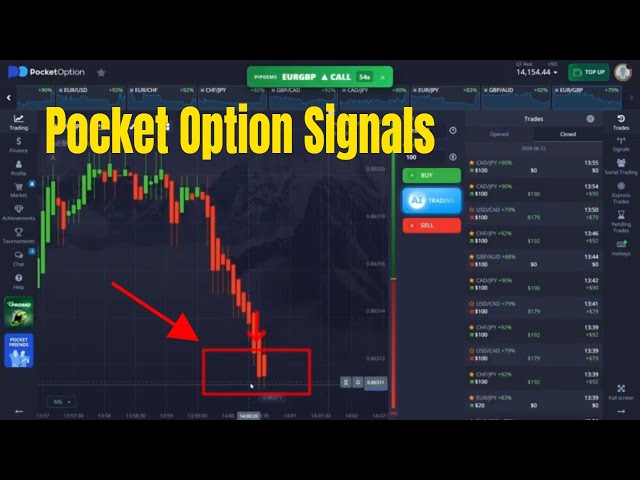
This is a live PipGems Signals session running directly alongside the Pocket Option platform. Instead of manually scanning every chart, the PipGems panel sits at the top of the screen and pushes a clear directional call — for example an EUR/GBP CALL with a countdown timer — so you know which pair to act on and which direction to take.
The goal of the session is simple: take only the highest-quality signals, match each one to a strong return rate, and keep the trade log filling up with green closes. Discipline matters more than volume — a handful of well-filtered 1-minute entries beats chasing every flashing signal on the board.
What PipGems Signals Do
- PipGems delivers a live CALL or PUT signal for a specific Pocket Option pair, with a countdown showing how long until the entry window closes
- The signal removes the guesswork of reading multiple indicators yourself — it surfaces the pair and direction already aligned
- Signals refresh continuously across the watched pairs, so you always have the next candidate queued up
- You stay in control of the final decision: the signal is the trigger, but return rate and timing decide whether you actually take it
Pairs Tracked in This Session
The session rotates through Pocket Option's most active majors and crosses, watching the return-rate ticker for each:
- EUR/GBP — the primary signal example, fired as a CALL during the session
- EUR/USD and EUR/CHF — high-liquidity majors with steady return rates
- CHF/JPY, CAD/JPY, USD/JPY — yen crosses that often carry the strongest return percentages
- GBP/CAD and GBP/AUD — wider-range crosses used when the majors go quiet
How to Run the Strategy
Step 1 — Watch the PipGems Signal Bar
- Keep the PipGems signal panel visible at the top of your Pocket Option screen
- Wait for a signal to display a pair, a CALL or PUT direction, and an active countdown
- Do not act on a signal whose countdown has nearly expired — you want a full candle window, not the last few seconds
Step 2 — Check the Return Rate
- Before entering, look at the pair's return percentage on the Pocket Option asset bar
- Favour pairs showing higher return rates (the strongest crosses in this session sat in the 79–92% range)
- Skip a signal if the return rate is low — a winning trade on a weak payout barely offsets the next loss
Step 3 — Enter on the 1-Minute Window
- Open the trade in the signalled direction with a 1-minute expiry as the new candle begins
- Use a fixed stake every time — do not increase size just because the last trade won
- Let the trade run to expiry; 1-minute signals are designed to settle on the close, not to be exited early
Entry Rules
CALL (Up) Entry
- PipGems fires a CALL signal on the target pair with time left on the countdown
- The pair's return rate is in your acceptable range (ideally 80%+)
- Open a CALL trade with a 1-minute expiry at the candle open
PUT (Down) Entry
- PipGems fires a PUT signal on the target pair with time left on the countdown
- The pair's return rate is in your acceptable range (ideally 80%+)
- Open a PUT trade with a 1-minute expiry at the candle open
If two signals appear at once, take the one on the higher return-rate pair and let the other go. Trying to enter both at the same time splits your attention and usually costs you the cleaner setup.
Keeping the Log Green
- Set a daily target in number of green closes, not in money — for example, stop after 6–8 winning trades
- Cap your stake at 1–3% of your balance per trade so a single red close never undoes a green streak
- Avoid revenge entries: after a loss, wait for the next clean, high-return signal rather than forcing one
- Stop the session after 2–3 consecutive losses — the market conditions that produced the green run have changed
- No Martingale on 1-minute signals; recovering a loss by doubling down compounds risk far faster than it recovers value
A green trade log is the result of skipping more signals than you take. PipGems gives you a steady supply of candidates — your edge comes from only acting on the ones backed by a strong return rate and a full entry window.
Watch the Live Session
See the PipGems signal panel paired with Pocket Option in a live session, with trades closing green across 1-minute entries.
Risk Disclaimer
This content is for educational purposes only. Trading involves significant risk. Past results do not guarantee future outcomes. Always practice responsible money management and only trade with capital you can afford to lose.
#PocketOption #PipGems #TradingSignals #BinaryOptions #1MinuteStrategy #OTCTrading #LiveTrading #ReturnRate #TradingEducation #RiskManagement