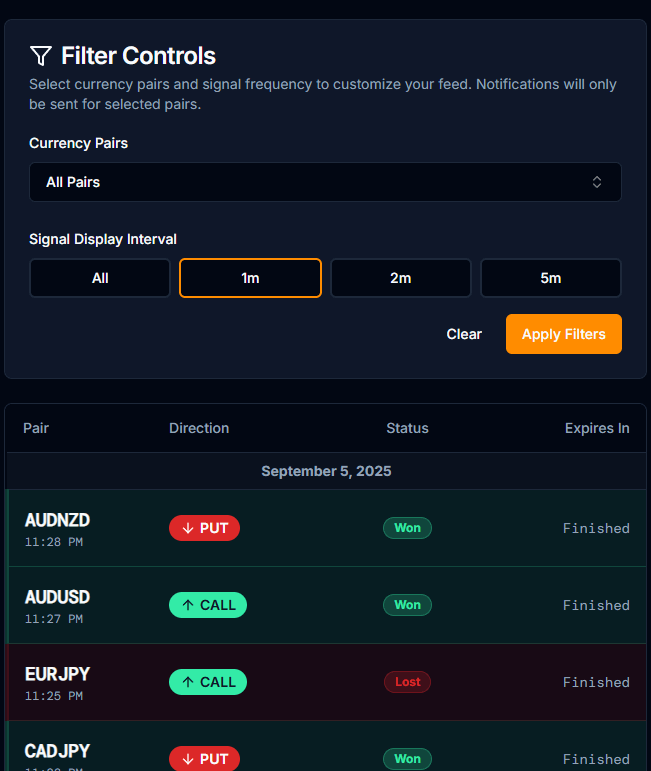
PipGems Live Signals Panel — filtering by currency pair and signal interval for precision 1-minute entries.
The Complete PipGems System
PipGems is more than a signal app — it's a full trading system. This guide covers every core feature: how signal filtering works, how to use the built-in Martingale calculator to survive losing streaks, and how the Strategy Hub turns your sessions into a structured, disciplined business plan.
Most traders who start using AI signal tools make the same mistake: they open the app, see a signal, and trade it — without any filtering, any risk management structure, or any session plan. The result is predictable. They win a few, lose a few, and wonder why the tool "doesn't work."
PipGems is built differently. Yes, it generates real-time AI-powered CALL and PUT signals across dozens of currency pairs. But the signals are only one piece. The platform also includes a signal filtering system, a built-in Martingale calculator, and a Strategy Hub that functions like a real trading business dashboard. This guide covers all three.
What Is PipGems? A Quick Overview
PipGems is a real-time AI trading signal application designed specifically for 1-minute / short-expiry trading on platforms. It continuously scans live market data and generates CALL (buy) or PUT (sell) alerts with a countdown timer, so you know exactly when to enter.
Traditional indicators paint signals on a chart you have to manually interpret. PipGems pushes a direct CALL or PUT alert in real time — eliminating the analysis step entirely. You filter your pairs, watch for the signal, and execute immediately. Speed and discipline are the only variables under your control.
But PipGems isn't just a signal board. The app is built around a philosophy: trading is a business, not gambling. That philosophy is reflected in every tool inside the platform — the filters, the Martingale calculator, and especially the Strategy Hub.
✨ Official App — Visit PipGemsLive AI Trading Signals · pipgems.com →How Signal Filtering Works — The Most Important Step
Before you place a single trade, you need to filter. This is the step most beginners skip — and it's the single biggest difference between traders who use PipGems effectively and those who don't.
The core idea is simple: PipGems generates signals for dozens of currency pairs simultaneously. But your broker only offers a subset of those pairs, and not all of them will have good win rates at any given moment. Trading a signal on a pair that isn't available — or has a low winrate — wastes the signal entirely.
PipGems — Signal Filter Panel.
Step 1 — Check Your Broker's Available Pairs First
Open your trading platform and check which currency pairs are currently available with the best win percentages. On most platforms, win rates change throughout the day as market sessions open and close. Always check before starting your session — not during it.
- Non-OTC pairs only — these use live real market price feeds, which is exactly what PipGems reads to generate signals. OTC pairs use synthetic pricing and cause signal mismatches.
- Good win percentage — aim for pairs showing 80%+ return. A lower winrate means you need a good win rate just to break even, which makes recovery much harder.
- Active market hours — trade pairs during their primary session (EUR/USD during European hours, USD/JPY during Asian hours, etc.) for the most reliable price action.
- Currently available on your platform — a pair that appears in PipGems but is unavailable on your broker right now is worthless. Match the lists before every session.
Step 2 — Configure the PipGems Filter Controls
Once you know which pairs are available and paying well, head into the PipGems filter panel. You have two main filter controls:
Open the currency pairs dropdown and select only the pairs from your broker's current list. Deselect everything else. This ensures every signal that appears in your feed is one you can actually trade.
Set your preferred signal spacing — every 1 minute, every 2 minutes, or every 5 minutes. For beginners, spacing signals out prevents over-trading and gives you time to process each entry calmly.
Setting a 2-minute or 5-minute signal interval doesn't mean fewer signals — it means PipGems spaces them out so you aren't flooded with alerts and tempted to rush entries. Slower pace = better execution = better results. Start with a wider interval and tighten it as you get comfortable.
The Built-In Martingale Calculator Explained
Martingale is one of the most misunderstood recovery strategies in trading. The concept is straightforward: after a losing trade, you increase your next trade size by a multiplier, so that when you eventually win, you recover all previous losses and land in net wins. The problem is that without a calculator, most traders either underestimate how fast trade sizes scale up — or they apply it recklessly and blow their account in a losing streak.
PipGems solves this with a built-in Martingale calculator that shows you exactly what a losing streak will cost before you ever place the first trade.
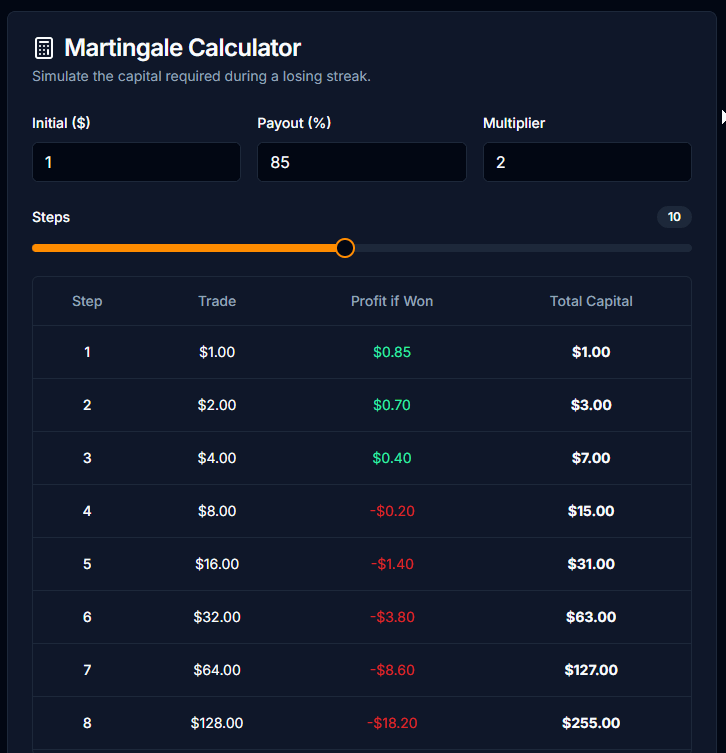
PipGems — Martingale Calculator.
How to Use the Martingale Calculator
Enter your starting trade amount and your chosen multiplier. The calculator instantly shows you the projected trade size for each step of a potential losing streak — so you can see exactly how much capital you'd need to survive 3, 4, or 5 consecutive losses before recovering.
| Step | Trade Size ($20 Start × 2.2) | Cumulative Loss if All Lose | Win Returns |
|---|---|---|---|
| Trade 1 | $20.00 | -$20.00 | +winnings |
| Recovery 1 | $44.00 | -$64.00 | +recovery |
| Recovery 2 | $96.80 | -$160.80 | +recovery |
| Recovery 3 | $212.96 | -$373.76 | +full recovery |
The purpose of the Martingale calculator is not to encourage reckless recovery. It's to show you the honest math before you commit capital. If the numbers on step 3 or 4 exceed your account balance, Martingale is not appropriate for your session size. Reduce your starting trade amount until the numbers are survivable — then trade.
- Price is in a strong overextended move — a reversal is statistically more likely
- The AI signal confirms direction for each recovery trade
- Your account balance can cover 3–4 recovery steps without wiping out
- You've pre-calculated step sizes using the PipGems calculator before starting
- The market is in a strong trending move — the trend can continue far longer than expected
- Recovery step 3+ would require more than 20% of your balance on a single trade
- You're applying it to every single loss regardless of market conditions
- You haven't set a stop loss on your total daily loss — runaway Martingale is an account killer
Strategy Hub: Trade Like a Business, Not a Gambler
The Strategy Hub is the most powerful — and most underused — feature inside PipGems. It's available to Pro users and it does something no ordinary signal app offers: it turns each trading session into a pre-planned, mathematically structured business operation.
Before you place a single trade, you define the entire session: your capital, your daily target, your maximum stop loss, your trade size, and your Martingale multiplier. The Hub then calculates every number automatically — and tracks every trade in real time, telling you exactly what to do next.
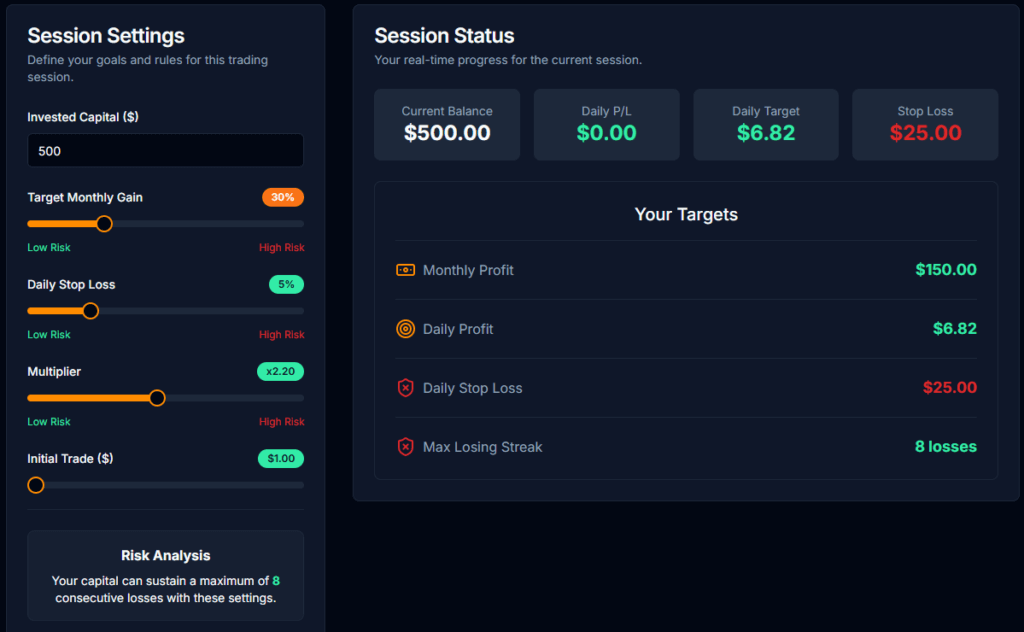
PipGems — Strategy Hub Dashboard.
What You Configure Before Each Session
Enter the total balance you're dedicating to this session. This is the number everything else is calculated from — your daily target, stop loss, and Martingale step sizes are all proportional to it.
Set a realistic monthly goal — typically 20–40%. The Hub reverse-engineers this into a daily target in real dollar terms based on your balance and trading days per month.
Define the maximum percentage of your capital you can lose in a single day before the Hub tells you to stop completely. Most professional traders set this between 3%–8%. This is your safety circuit breaker.
Set your base trade size and your recovery multiplier (e.g., ×2.2). The Hub will automatically calculate every recovery trade size in sequence — you'll never need to calculate in the heat of the moment.
How the Hub Guides You in Real Time
Once your session is defined, the Hub works alongside every trade you take. After each trade, you simply log the result as a Win or a Loss — and the system responds with precise instructions:
After a Win: The Hub resets your trade size back to the initial base amount. It also checks whether you've hit your daily target — if yes, it advises you to stop trading and lock in your gains.
After a Loss: The Hub automatically calculates the exact dollar amount for your next recovery trade. You don't have to do mental math mid-session — it's already calculated and displayed.
Daily Stop Loss Reached: The Hub alerts you when cumulative losses for the day hit your preset stop-loss limit. This is a hard signal to stop — not a suggestion. Protecting tomorrow's trading capital is more important than any single session.
Daily Target Reached: The Hub tells you your session is done — the profit is secured. Stop trading. Experienced traders know when to walk away; the Hub enforces that discipline automatically.
The biggest reason traders lose money is not bad signals — it's bad decisions made after a loss. Chasing losses, skipping the stop loss, doubling up without a plan. The Strategy Hub removes all of those decisions from your hands. You pre-commit to a plan before emotions enter the picture, and the Hub holds you to it.
How to Set Up a Full PipGems Trading Session
Here's the complete workflow that combines all three features — filtering, the Martingale calculator, and the Strategy Hub — into one repeatable session routine:
Open any platform (or your broker) and note which non-OTC pairs are available with good percentages right now. Write them down — this is your approved list for today.
Log in to pipgems.com and open the filter panel. Select only the pairs from your approved list. Set your signal interval — 1 minute for experienced traders, 2–5 minutes if you're newer.
Enter your starting trade size and multiplier into the Martingale calculator. Look at step 3 and step 4 — can your account cover those amounts? If not, reduce your base trade size until the numbers are comfortable.
Open the Strategy Hub, enter your invested capital, monthly target %, daily stop loss %, initial trade amount, and multiplier. Review the calculated daily target and stop loss limit. Commit to both before you trade.
Watch the live signals feed. When a signal appears for one of your filtered pairs, execute immediately on your broker — then log the result (Win or Loss) in the Strategy Hub. Let the Hub calculate your next step.
Whether you've hit your daily target or your stop loss limit, when the Hub signals the session is over — stop. No exceptions. The discipline of stopping on time is worth more than any individual trade.
Anyone can open a chart and guess a direction. A trader who runs a filtered signal, verifies position sizing with a Martingale calculator, and operates inside a pre-defined Strategy Hub session — that person is running a business. The routine above is exactly what separates consistent traders from those who blow their accounts inside a month.
Ready to Try PipGems?
Access the live signal feed, Martingale calculator, and Strategy Hub — all in one app.
Visit PipGems →Frequently Asked Questions
Is PipGems free to use?
PipGems offers access through a membership, including a version bundled with the UltimateFXtools lifetime membership (which unlocks the full signal feed, Strategy Hub, and 100+ additional trading tools). You can also access PipGems directly at pipgems.com.
What platforms work with PipGems signals?
PipGems is designed for 1-minute trading. The key requirement is that you use the non-OTC currency pairs on your platform, since PipGems reads live market data and non-OTC pairs mirror that data accurately.
Do I need to use the Martingale strategy?
No. The Martingale calculator and recovery method are optional tools inside PipGems. Many traders use PipGems with a flat position size — taking signals and moving on regardless of each trade's result. Martingale adds risk alongside recovery potential; it should only be used if your account size and risk tolerance make the step sizes manageable.
How accurate are PipGems signals?
Signal accuracy depends heavily on how well you've configured your filters, how quickly you execute entries, and overall market conditions. The PipGems system is designed to give a statistical edge when used correctly — filtered for the right pairs, executed immediately, and operated within a disciplined Strategy Hub session.
What's the right multiplier for the Martingale calculator?
A multiplier of ×2 to ×2.5 is the standard range for Martingale recovery. At ×2.2, most traders can cover 3 recovery steps before the trade sizes become uncomfortably large. Always run the calculator first and choose a multiplier where step 3 is still within 10–15% of your total account balance.
Can I use PipGems on mobile?
Yes. PipGems is accessible via web browser, which means it runs on any mobile device. Many traders keep PipGems open on a phone or tablet while their broker platform runs on a laptop — it's an effective two-screen setup for 1-minute trading.