Why Keep the Quotex Chart Empty
Stack four or five indicators on a Quotex chart and the candles disappear under lines. In this session the Quotex chart stays bare. The analysis runs on MetaTrader 4, where Sniper Pro V3 (it shows up as BinarySniperPRO v3.01 on the chart) watches several pairs on 1-minute charts. When it spots a reversal it pops up an alert with the pair and the direction, and the trade goes on Quotex by hand.
The stake is a flat $20 on every trade, the expiry is 2 minutes, and there is no martingale. We read every value in this post off the video frames and checked each result against the trade history and the account balance.
The Setup, Exactly as Shown
| Item | Setting |
|---|---|
| Indicator | Sniper Pro V3 (BinarySniperPRO v3.01) with pop-up alerts switched on |
| Platform for signals | MetaTrader 4 on a RoboForex demo account; it only supplies price data and alerts |
| Charts | M1, one chart per pair, all on tabs in one MT4 window |
| Pairs at the start | EUR/USD, AUD/JPY, EUR/GBP, GBP/USD, GBP/JPY, GBP/AUD, GBP/CHF (regular pairs, no OTC) |
| Pairs at the end | EUR/USD, AUD/JPY, EUR/GBP, GBP/USD, AUD/CAD |
| Trade | Quotex, 2-minute expiry, $20 flat, payouts 78% to 87% |
| Recorded | 7 November, per the trade history (the MT4 chart dates read 2022), so today’s payouts will differ |
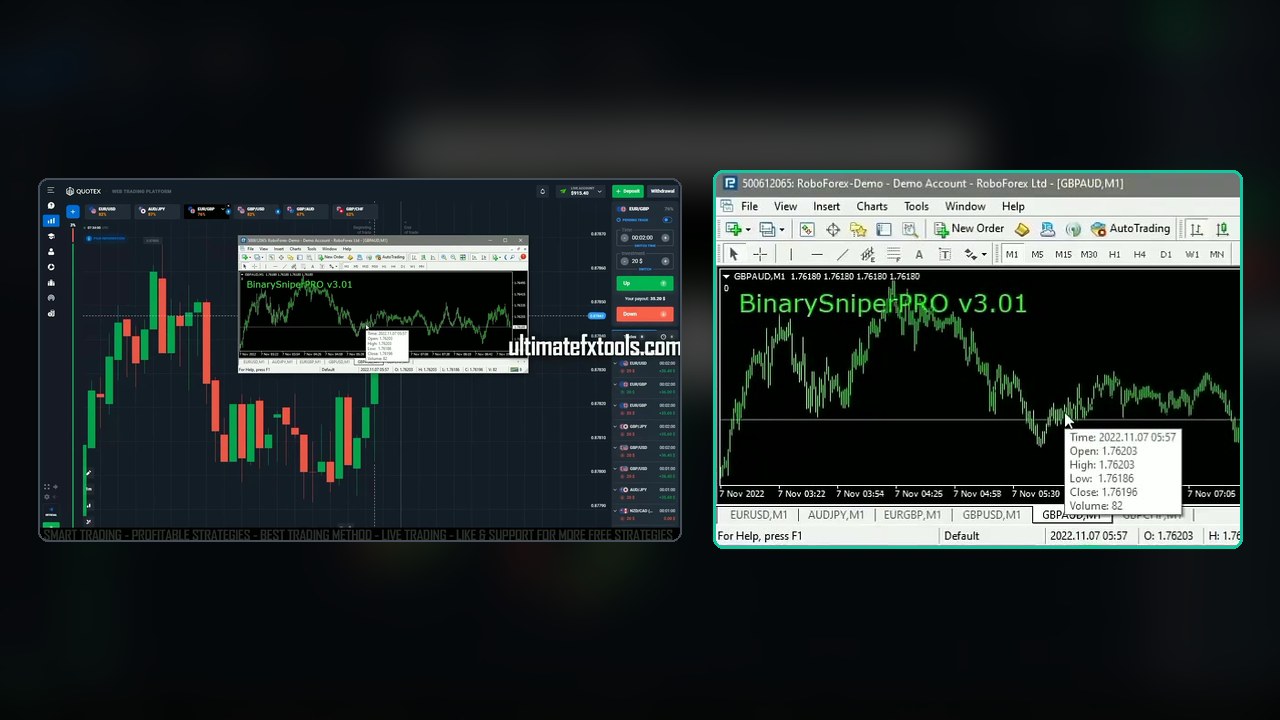
The MT4 window floats over the Quotex tab. Each pair has its own M1 chart along the bottom, and Sniper Pro V3 is loaded on each one. You never need to look at the MT4 candles. The window is there so the alerts can reach you.
How to Set It Up
- Install MetaTrader 4 on a Windows PC. A free demo account from any broker is enough, since no trades are placed in MT4.
- Open one M1 chart for each pair you plan to trade and load Sniper Pro V3 on every chart, with alerts enabled.
- On Quotex, open the same pairs as tabs. Check the payout on each tab before you start.
- Set the Quotex trade to 2 minutes and $20 (or your own flat stake), and leave the chart free of indicators.
- Keep both windows visible. When an alert pops up, switch to that pair on Quotex and place the trade in the alert’s direction.
Reading an Alert
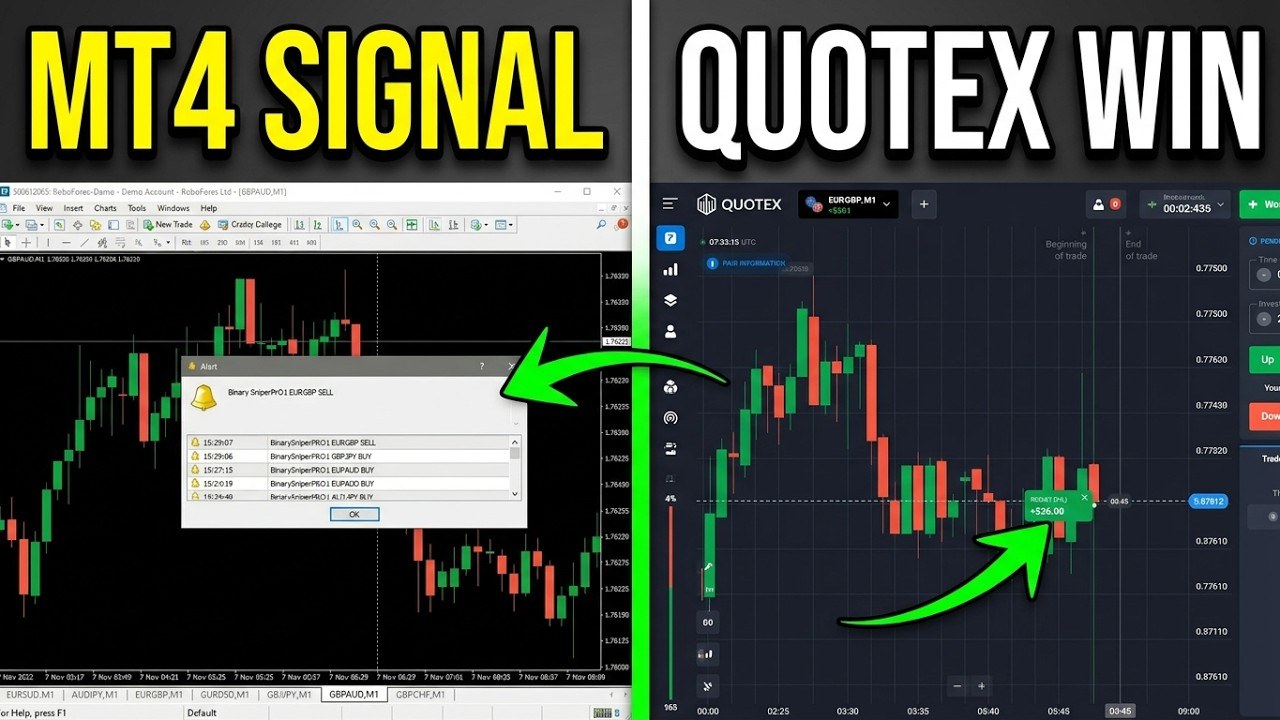
Each alert is one line: the time, the indicator name, the pair and the direction, for example BinarySniperPRO1 EURGBP BUY. BUY means an UP trade on Quotex and SELL means DOWN. Older alerts stay in the list underneath, so you can see if several pairs fired at the same moment.
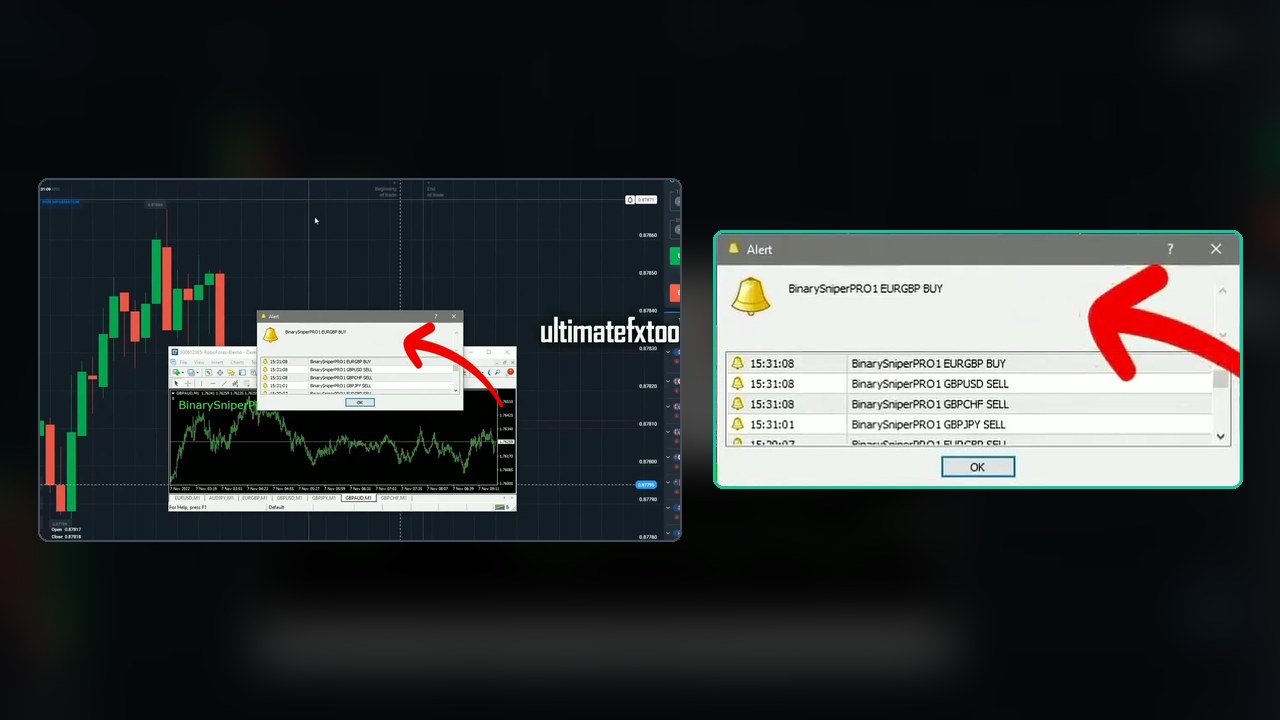
That screenshot also shows the main catch. Within seven seconds four pairs fired: GBP/JPY SELL at 15:31:01, then EUR/GBP BUY, GBP/USD SELL and GBP/CHF SELL together at 15:31:08. Only the EUR/GBP alert was traded. The video does not say how the trader picked it, so set your own rule before you start, such as one trade at a time, or best payout first.
Drop the Pairs That Don’t Pay
About a minute and a half in, the on-screen caption says “delete unnecessary trading currency”, and the trader closes pairs in both MT4 and Quotex. GBP/JPY was paying only 59%, and GBP/AUD and GBP/CHF later fell to 63% and 56%. All three were closed, and AUD/CAD at 75% was added later in the session.
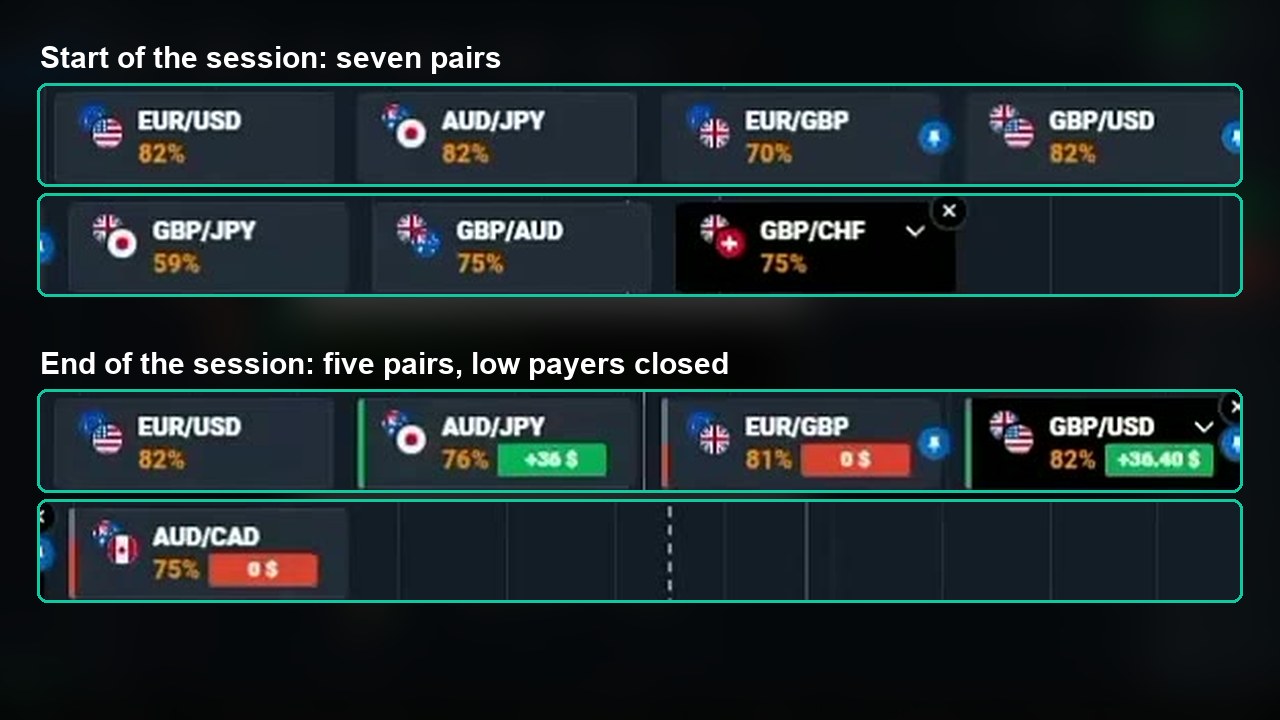
This step matters more than it looks. At an 82% payout you need to win about 55% of trades just to break even. At 59% you need about 63%. A pair with a weak payout makes even a good alert a bad trade. Fewer pairs also means fewer alerts firing at the same moment.
All Nine Trades, Checked
The live balance starts at $867.40. Each trade takes $20 off when it opens and returns the stake plus profit on a win, so every step can be read from the top of the screen.
| # | Pair | Alert | Quotex trade | Payout | Result |
|---|---|---|---|---|---|
| 1 | EUR/GBP | SELL | DOWN | 78% | +$15.60 |
| 2 | EUR/GBP | BUY | UP | 80% | +$16.00 |
| 3 | EUR/USD | SELL | DOWN | 82% | +$16.40 |
| 4 | AUD/JPY | BUY | UP | 87% | +$17.40 |
| 5 | EUR/USD | SELL | DOWN | 82% | Draw, $20 back |
| 6 | AUD/JPY | SELL | DOWN | 80% | OPEN in profit at 0:00 left |
| 7 | GBP/USD | SELL | DOWN | 82% | OPEN in profit, 15s left |
| 8 | AUD/CAD | BUY | UP | 75% | OPEN losing, 38s left |
| 9 | EUR/GBP | BUY | UP | 81% | OPEN losing, 1:02 left |
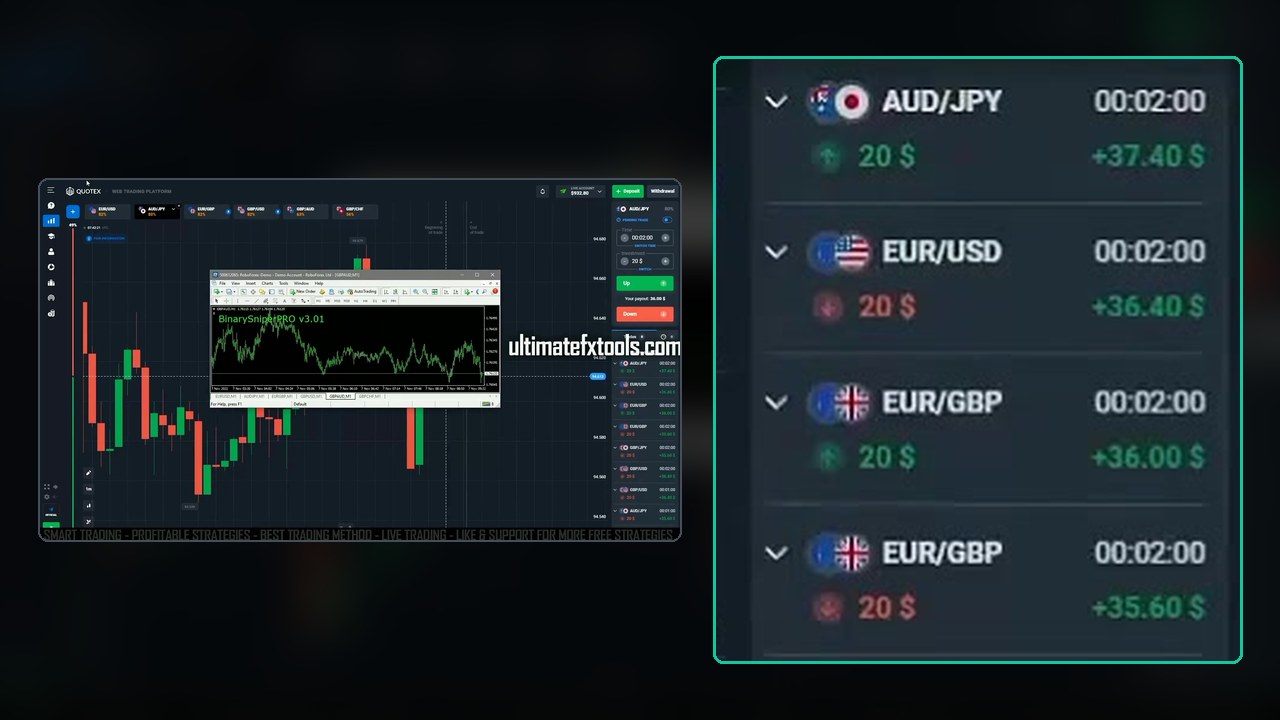
The first four trades all win. The balance goes from $867.40 down to $807.40 while three trades are open, then up to $843.00 and $915.40 as they pay out. Trade 4 on AUD/JPY lifts it to $932.80, the high point of the video.
The Second Half: Five Alerts in About a Minute
After a quiet spell, five alerts arrive between 15:43:20 and 15:44:27: EUR/USD SELL, AUD/JPY SELL, GBP/USD SELL, AUD/CAD BUY and EUR/GBP BUY. All five are taken, which leaves $100 at risk at the same time. Trade 5 on EUR/USD closes exactly where it opened, so it is a draw and the $20 comes back.
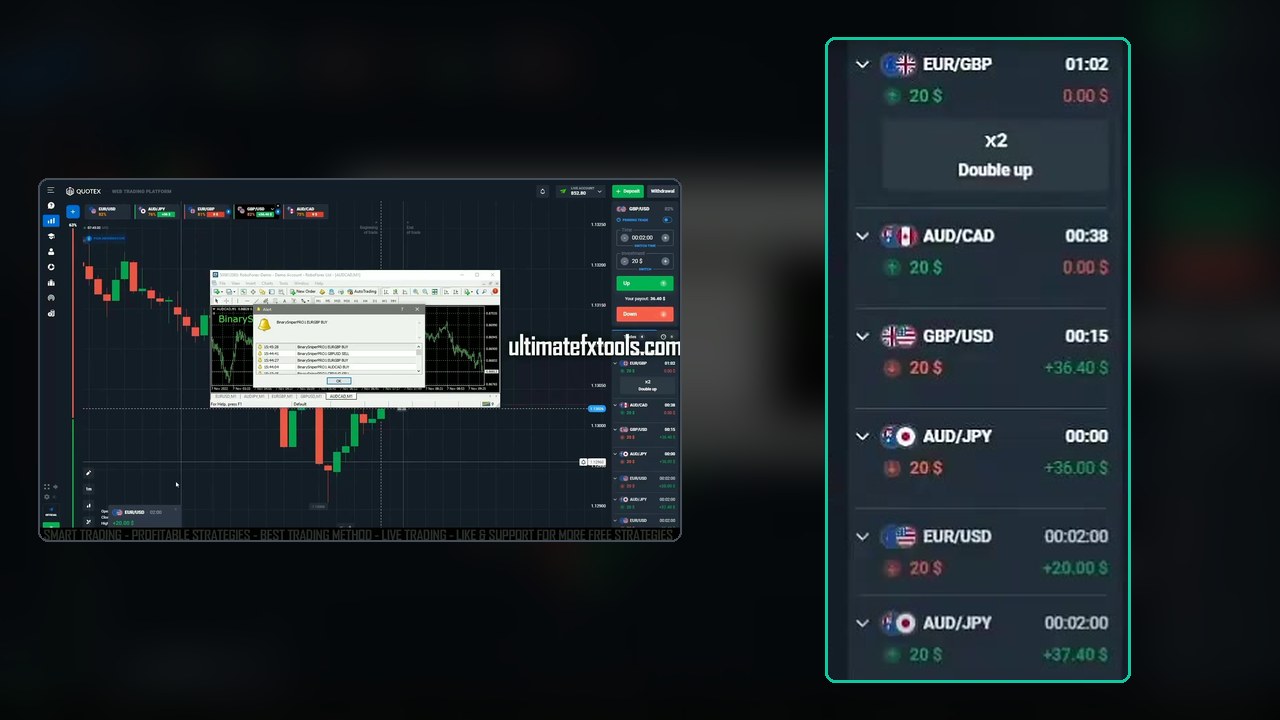
The video ends with four trades still open. AUD/JPY and GBP/USD are in profit with seconds to go, while AUD/CAD and EUR/GBP are not. We can’t see how they settled, so they are not counted as wins or losses here.
The arithmetic: four wins add +$65.40 and the draw adds $0. Start at $867.40, add $65.40 and subtract the $80 still in the four open trades, and you get $852.80, which is exactly the balance on screen at the end. If the two in-profit trades win and the other two lose, the session finishes +$57.80. If all four lose, it finishes −$14.60.
Watch the Video
Just over eight minutes, with every alert and trade on screen:
Limits to Keep in Mind
- Nine trades is a demonstration, not a record. Four closed wins and one draw say nothing reliable about a long run of trades.
- Regular pairs only, never OTC. MT4 reads the real forex market. Quotex OTC prices come from the broker’s own feed, so an MT4 alert says nothing about an OTC chart. Trade only pairs that exist in both places, and expect the alerts to stop when the forex market is closed.
- Alerts arrive in clusters. Several pairs often fire within seconds. Taking all of them stacks your risk, as the second half of the video shows.
- Price can differ slightly between MT4 and Quotex. The demo broker’s feed and the Quotex feed are not identical, so act fast and skip an alert if the Quotex chart has already moved away.
- Windows only. Custom MT4 indicators don’t run in the MT4 or MT5 mobile apps, so you need a PC.
- Payouts change. The percentages in this post are from the day it was recorded. Check them every session.
Risk Management
- Keep the stake flat, the way the video does. Don’t use the Double up button to chase a loss.
- Decide in advance how many trades can be open at once. One or two is easier to manage than five.
- Set a daily loss limit and a maximum number of trades, and stop when you hit either one.
- Practise on the Quotex demo account and log at least 50 alerts before you risk real money.
- Binary and fixed-time trading is restricted in some countries, so check the rules where you live, and only trade money you can afford to lose.
Frequently Asked Questions
What do you need to trade Sniper Pro V3 alerts on Quotex?
A Windows PC with MetaTrader 4, the Sniper Pro V3 indicator loaded on a 1-minute chart for each pair you want to watch, and Quotex open in a browser next to it. The MT4 account can be a free demo account because it only supplies price data and alerts. The trades are placed by hand on Quotex.
What expiry and stake are used in the video?
Every trade is a flat $20 with a 2-minute expiry on Quotex, taken from alerts on 1-minute MT4 charts. There is no martingale and no doubling: the Double up button Quotex shows is never pressed.
Why close some pairs during the session?
Payout decides how much a win is worth. GBP/JPY was paying 59 percent and GBP/AUD and GBP/CHF fell to 63 and 56 percent, so they were closed in both MT4 and Quotex. At 59 percent you need to win about 63 percent of trades just to break even, against about 55 percent at 82 percent.
Can Sniper Pro V3 be used on Quotex OTC pairs?
No. MT4 reads the real forex market, while OTC prices are generated by the broker and can move differently. Use the alerts only on regular pairs that exist in both MT4 and Quotex, which is what the video does.
What was the result in the video?
Nine $20 trades. Four won (+$15.60, +$16.00, +$16.40 and +$17.40), one EUR/USD trade closed as a draw with the stake returned, and four were still open when the video ends: two in profit and two not. The closed trades add up to +$65.40, and the balance moves from $867.40 to $852.80 with $80 still tied up in the open trades. Nine trades is far too few to judge the indicator.
The Verdict
4 out of 5. Keeping the analysis in MT4 and the Quotex chart empty is a tidy way to work. Dropping the low-payout pairs in the middle of the session is a habit worth copying, and every closed trade in the video checks out against the balance. It loses a point because the video never explains which alerts get skipped, the second half stacks five trades at once, and it ends before four of them settle.
If you already use Sniper Pro V3, this is a good way to run it. Keep your pair list short, trade only pairs that pay well, take one alert at a time, and let a demo log tell you whether it works for you.
#Quotex #SniperProV3 #MT4Alerts #BinaryOptions #1MinuteChart #ForexSignals #TradingIndicators
This content is for educational purposes only and is not financial advice. Trading involves substantial risk; you can lose some or all of your capital. No result is guaranteed and past results do not indicate future outcomes. Always practise responsible money management, limit your daily trades, and trade only what you can afford to lose.
Related reading: another MT4 alert workflow is in Quotex + Dream X 3, MT4 trend alerts across four charts. An older Quotex session with this indicator is in Amazing Trading Strategy with Sniper Pro, and every setup we have for it is collected in Top Sniper Pro Strategies. For more, browse the Quotex hub or the full strategy library.