Sniper Pro V3 — Advanced 1-Minute Reversal Detector for MT4 & MT5
👤 ultimatefxtools 📅 ★★★★★4.0 / 5 🏷️ Indicator · Sniper Pro · MT4 · MT5 ★★★★★
Rated 4 out of 5
🎯 MT4 & MT5 Indicator
Sniper Pro V3
"Advance 1 Minute Reversal Detector"
"Professional 1 Minute Indicator"
1-Minute Trading
Price Reversal Alerts
Martingale Compatible
MT4 & MT5
Major Currencies
🔓 Get Lifetime Access — $39
📋 Changelog
V3
V3.1
V3.2 Beta
V3.4 ✓ Latest
🎯 What Is This Indicator?
★★★★★
Rated 4 out of 5
🎯 MT4 & MT5 Indicator
Sniper Pro V3
"Advance 1 Minute Reversal Detector"
"Professional 1 Minute Indicator"
1-Minute Trading
Price Reversal Alerts
Martingale Compatible
MT4 & MT5
Major Currencies
🔓 Get Lifetime Access — $39
📋 Changelog
V3
V3.1
V3.2 Beta
V3.4 ✓ Latest
🎯 What Is This Indicator?
Sniper Pro V3 — Price Reversal Detection at the Opening Bar
Sniper Pro V3 is a professional-grade MT4 and MT5 indicator that identifies price action reversals and fires a real-time alert at bar open. Designed for 1-minute chart trading on major currency pairs — with full Martingale strategy compatibility and an advanced algorithm that calculates reversal probability in real time.
Reversal Detection Opening Bar Alerts MT4 & MT5 Major Currencies Martingale Compatible 1-Minute Optimized 📋 Table of Contents- What Is Sniper Pro V3?
- How Sniper Pro V3 Works
- Understanding the Alert Signal
- Setup Guide — First Use Instructions
- Strategies & Platform Guides
- Video Tutorial
- Frequently Asked Questions
What Is Sniper Pro V3?
Sniper Pro V3 is an advanced price action indicator for MetaTrader 4 and MetaTrader 5. It analyzes price movement patterns that tend to produce reversals — and when those conditions are met, it fires an alert at the opening of the bar, giving you a clear, timely signal to execute on.
Unlike indicators that repaint or lag behind price, Sniper Pro V3 is designed to alert you at the opening bar — meaning the signal is generated at the start of the candle, not after it's already moved. For 1-minute trading, that timing is critical.
🎯 Sniper Pro V3 — Key Features ✓Easy to Trade — clean alert output, no complex chart interpretation required. The signal tells you exactly what direction to trade and fires at bar open. ✓MT4 & MT5 Compatible — works on both MetaTrader platforms. Download includes both.ex4 and .ex5 files.
✓Multiple Alerts Per Session — the indicator alerts as many times as conditions are met throughout your session. No single-shot limitation.
✓Advanced 1-Minute Market Predictions — the algorithm is specifically calibrated to the 1-minute timeframe for maximum signal accuracy.
✓Martingale Strategy Compatible — because it can alert multiple times per session, it pairs naturally with structured Martingale recovery setups.
✓Optimized for 1-Minute Trading — built from the ground up for short-expiry conditions on the M1 chart.
How Sniper Pro V3 Works
Sniper Pro V3 uses an advanced algorithm to continuously analyze price reversals across the chart. When the conditions for a reversal are detected, it fires a BUY or SELL alert at the opening of the new bar — giving you a clear execution window before the move has already started.
1 1 Trade at a TimeFocus on one active signal at a time. When an alert fires, execute that trade, wait for it to close, then monitor for the next signal. Avoid stacking multiple open positions simultaneously.
2 Trade on Normal Markets OnlySniper Pro V3 is designed for normal live market conditions. Avoid trading during major news events or periods of abnormal volatility where price action becomes erratic and unpredictable.
3 Best for Major Currency PairsThe indicator performs best on major pairs — EUR/USD, GBP/USD, USD/JPY, AUD/USD, USD/CAD, and similar high-liquidity pairs. These offer the cleanest price action data for reversal detection.
⏱️Important: Wait 5 Minutes After First Attaching the Indicator
When you first attach Sniper Pro V3 to a chart — or restart MetaTrader — leave it running for at least 5 minutes before acting on any signal. The indicator needs this time to calculate historical price data and fully calibrate its algorithm. Acting on early alerts before calibration completes may produce unreliable signals.
Understanding the Alert Signal
Sniper Pro V3 fires a MetaTrader pop-up alert when a reversal condition is detected. The alert window displays the currency pair and direction (BUY or SELL) — giving you everything needed to execute immediately on your platform.
Sniper Pro V3 — Live Alert Signal on MT5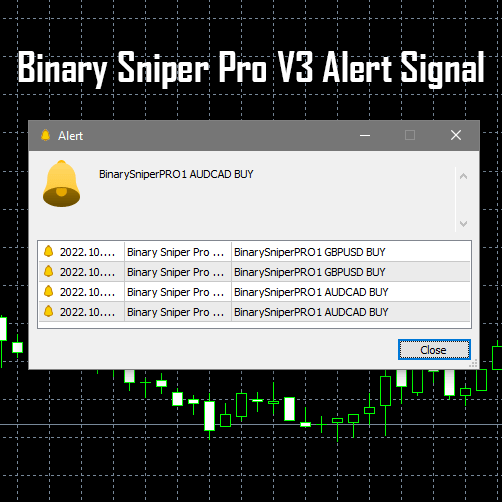
The alert shows the pair name and direction — for example, BinarySniperPRO1 AUDCAD BUY. Execute your trade on that pair in the indicated direction as quickly as possible. The algorithm predicts the likely direction of the next bar, so entry speed directly impacts signal quality.
How the Algorithm Makes Its Prediction
The indicator predicts the probable reversal direction of the next bar using an advanced algorithm that calculates the reasonable probability of price moving up or down — based on current price action conditions. Given the signal, execute your trade as fast as possible. Every second of delay reduces the quality of the entry window.
✅ Best Conditions for Signals ✓During active market sessions — London, New York, or the overlap ✓Major currency pairs with high liquidity and clean price action ✓After the indicator has run for at least 5 minutes following attachment ✓Normal market conditions — no major news events scheduled imminently 🚫 Avoid These Conditions ✗During major news releases — spreads widen and price action becomes unreliable ✗Low-volume periods — thin markets produce weaker reversal signals ✗Acting on alerts within the first 5 minutes of attaching the indicator ✗Exotic or low-liquidity pairs — price action is less reliable for reversal detectionSetup Guide — First Use Instructions
1 Download & InstallDownload Sniper Pro V3 from your UltimateFXtools members area. Copy the .ex4 (MT4) or .ex5 (MT5) file into your MetaTrader Indicators folder via: File → Open Data Folder → MQL4/MQL5 → Indicators. Restart MetaTrader.
Open any major currency pair on the M1 (1-minute) timeframe. Drag Sniper Pro V3 from the Navigator panel onto the chart and enable popup alerts in the settings window.
Leave the indicator running for at least 5 minutes to complete its historical data calculation and calibration. Ignore all alerts during this initial window.
Once calibrated, watch for alert popups. When one fires, immediately execute in the indicated direction on your platform. The signal is for the opening of the current bar — speed of execution is critical.
🔵Looking for the Original Stable Version?
The original stable release is also available: ultimatefxtools.com/binary-sniper-pro — works on both MT4 and MT5 and remains a reliable choice.
Sniper Pro V3 Strategies & Platform Guides
The indicator is only part of the picture. The resources below show you exactly how to apply Sniper Pro V3 in real trading sessions — including live results across multiple platforms and a full Olymp Trade session breakdown.
📊 Strategy Guide Top Sniper Pro Strategies — Multiple Platforms How Sniper Pro V3 is used across different brokers and trading setups. Includes entry rules, session timing, and real trade execution walkthroughs. Read the strategies → 📈 Live Session — Olymp Trade Profitable Trading with Sniper Pro V3 on Olymp Trade A complete live session walkthrough using Sniper Pro V3.01 on Olymp Trade — showing signal entries, trade execution, and session results. Watch the session → 💡Martingale + Sniper Pro V3 — A Natural Pairing
Because Sniper Pro V3 can alert multiple times per session on the same pair, it pairs naturally with a Martingale recovery approach. When a signal results in a loss, the next alert in the same direction provides a signal-confirmed recovery opportunity — rather than a blind position scale-up.
Video Tutorial — How to Use Sniper Pro V3
The video below demonstrates Sniper Pro V3 in a live MT5 session — showing the alert popup, chart setup, and real trade execution from start to finish.
Frequently Asked Questions
Does Sniper Pro V3 work on both MT4 and MT5?
Yes. Sniper Pro V3 is fully compatible with both MetaTrader 4 and MetaTrader 5. The download includes both platform files — use the .ex4 for MT4 and the .ex5 for MT5. Both versions behave identically.
What timeframe is Sniper Pro V3 designed for?
Sniper Pro V3 is specifically optimized for the 1-minute (M1) timeframe. Its algorithm is built and calibrated around 1-minute price action patterns. For consistent results, always run it on M1 charts.
Why do I need to wait 5 minutes before trading?
When first attached — or after a MetaTrader restart — Sniper Pro V3 requires approximately 5 minutes to load and process historical price data for calibration. Alerts generated during this window are pre-calibration and should be ignored. After 5 minutes, the indicator is fully live and signals are reliable.
What is the difference between Sniper Pro V3 and the stable V1?
Sniper Pro V3 (including V3.1, V3.2 Beta, and V3.4) is the advanced evolution of the original indicator with an improved reversal algorithm. The stable V1 version is still available at ultimatefxtools.com/binary-sniper-pro for traders who prefer the original algorithm.
Can I use Sniper Pro V3 with a Martingale recovery system?
Yes — Sniper Pro V3 is explicitly Martingale-compatible. Because it alerts multiple times per session on the same pair, it provides signal-confirmed recovery entries rather than requiring blind position scaling. Always pre-calculate your Martingale step sizes before starting any recovery session.
Which currency pairs work best with Sniper Pro V3?
The indicator performs best on major currency pairs — EUR/USD, GBP/USD, AUD/USD, USD/JPY, USD/CAD, and similar high-liquidity pairs. These provide the cleanest price action data for the reversal detection algorithm. Avoid exotic pairs with wide spreads or thin volume.
#SniperProV3 #ReversalIndicator #MT4Indicator #MT5Indicator #1MinuteTrading #PriceReversal #MartingaleCompatible #ForexIndicator #OpeningBarAlert #UltimateFXtools ⚡ 67% OFF — Limited TimeGet Sniper Pro V3 + 100+ More Tools
One lifetime membership unlocks Sniper Pro V3, every MT4/MT5 indicator, all strategy guides, EAs, scripts, and video tutorials.
$119 $39 Get Lifetime Access — $39 One-time payment · No subscriptions · Instant access 🛡️ 🔒 Secure Checkout ⚡ Instant Access 🎯 Related Resources 🔵 Indicator
Sniper Pro V1 — Stable Version
📊 Strategy Guide
Top Sniper Pro Strategies
📈 Live Session
Sniper Pro V3 on Olymp Trade — Live Results
🔵 Indicator
Sniper Pro V1 — Stable Version
📊 Strategy Guide
Top Sniper Pro Strategies
📈 Live Session
Sniper Pro V3 on Olymp Trade — Live Results