Quotex Alert Signal
Quotex is a fixed-expiry platform: every position resolves on a timer, so the only question is whether price sits higher or lower when that timer runs out. An alert signal tells you the moment a chart condition appears, instead of staring at candles for hours. The alerts here come from the Binary Sniper Pro V3 indicator in MetaTrader; the trade is placed on the matching pair in Quotex. Be clear about what the popup tells you: a set of rules has just become true on the chart. That is all. It is a prompt to look, not an instruction to click.
What an Alert Indicator Actually Does
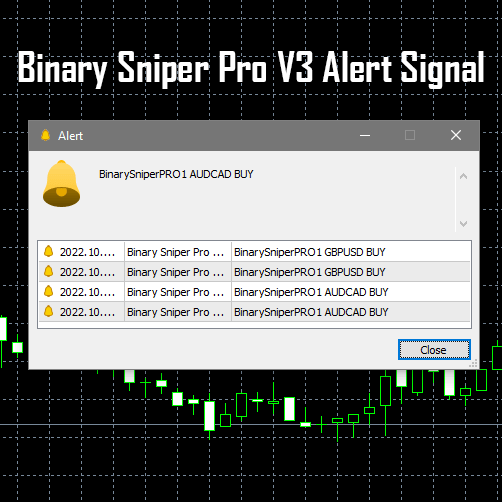
Binary Sniper Pro V3 watches price action on the one-minute chart for the reversal conditions it was coded to detect. When those line up, MetaTrader fires a popup naming the pair and a direction — for example BinarySniperPRO1 AUDCAD BUY. That popup describes what price has already done; it is not a forecast of the next candle. An indicator has no view on the news calendar, the spread you will get, or what you can afford to lose. Those judgements stay with you. Treating an alert as a decision rather than a prompt is the most common way traders get hurt with signal tools.
Why Alerts Fire in Chop
Reversal logic looks for price stretching away from its recent average and snapping back. In a flat, low-volume market price stretches and snaps back constantly over a pip or two — exactly the shape the rules were written to catch. So alert tools are often busiest when conditions are worst. Dead range-bound hours and the minutes either side of a scheduled release produce alerts that are technically correct and practically useless. Knowing which alerts to skip does more for your consistency than any change of indicator.
How to Confirm an Alert Before You Act
Run a short, fixed checklist every time a popup appears. If any item fails, skip the alert:
- Session: is a major session actually open? Alerts during thin, quiet hours carry far less information than the same alert during the London–New York overlap.
- Structure: does the direction make sense against the recent swing highs and lows? A buy alert printed straight into obvious overhead resistance is fighting the chart.
- Calendar: is a high-impact release due in the next few minutes? If so, stand aside until spreads normalise.
- Yourself: have you already hit your trade cap or your loss limit for the session? An alert is never a reason to break your own rules.
Setting Up the Alert on a 1-Minute Quotex Workflow
Attach Sniper Pro V3 to an M1 chart of a liquid major — EUR/USD, GBP/USD, USD/JPY, AUD/USD or USD/CAD — and enable popup alerts in the indicator's settings window. Leave it running for at least 5 minutes after you attach it or restart MetaTrader; it needs that time to read historical data and calibrate, and anything firing inside that window should be ignored. The signal is generated at the opening of the bar, so match your Quotex expiry to the chart: a 1-minute expiry for an M1 alert. Keep one trade open at a time.
Risk control decides whether you are still trading next month. Stake a small, fixed fraction of your balance on every trade rather than sizing up after a loss, cap the number of trades per session in advance, and stop for the day once you hit a preset loss limit. Losing trades are a permanent feature of fixed-expiry trading — no alert removes them. Run the whole workflow on a demo account until the checklist above is automatic.
Red Flags in a Signal Source
Whether signals come from an indicator, a chat group or a bot, the warning signs are the same. Any source that quotes a win rate is the biggest one: nobody can know the rate of trades that have not happened yet, so a headline number is marketing, not measurement. Be equally wary of sources that never show a losing trade, that push you to increase stake size to recover a loss, or that hand you a direction with no reasoning you can check. A tool that plots on your own chart, where you can see which condition fired and decide for yourself, differs from a stranger telling you to click up. To compare with other reads on the same platform, see the Quotex 1 minute strategy and this Quotex alert signal strategy.
FAQ
Does the alert predict the next candle?
No. It flags that a reversal condition the indicator was coded to look for has just been met — price behaviour that has already happened. Follow-through is never certain, and losing trades are normal.
Why wait 5 minutes after attaching the indicator?
Sniper Pro V3 calculates from historical price data when it loads. Until that completes, alerts can fire on incomplete information. Attach it to the M1 chart, give it five minutes, then start reading popups.
Where do I get the indicator?
Binary Sniper Pro V3 is part of the library included with the single $39 lifetime plan, covering every tool on the site for MT4 and MT5. Practise on demo first.
This content is for educational purposes only. Trading involves risk. Past results do not guarantee future outcomes. Always practice responsible money management and limit your daily trades to avoid large losses.